
Development· Web Applications
Booking & Scheduling Systems
A diary that won't let you double-book, reminds customers for you and sits on every phone in the business. We build each one around how your jobs work.
What we do
What we build
A diary that stops clashes
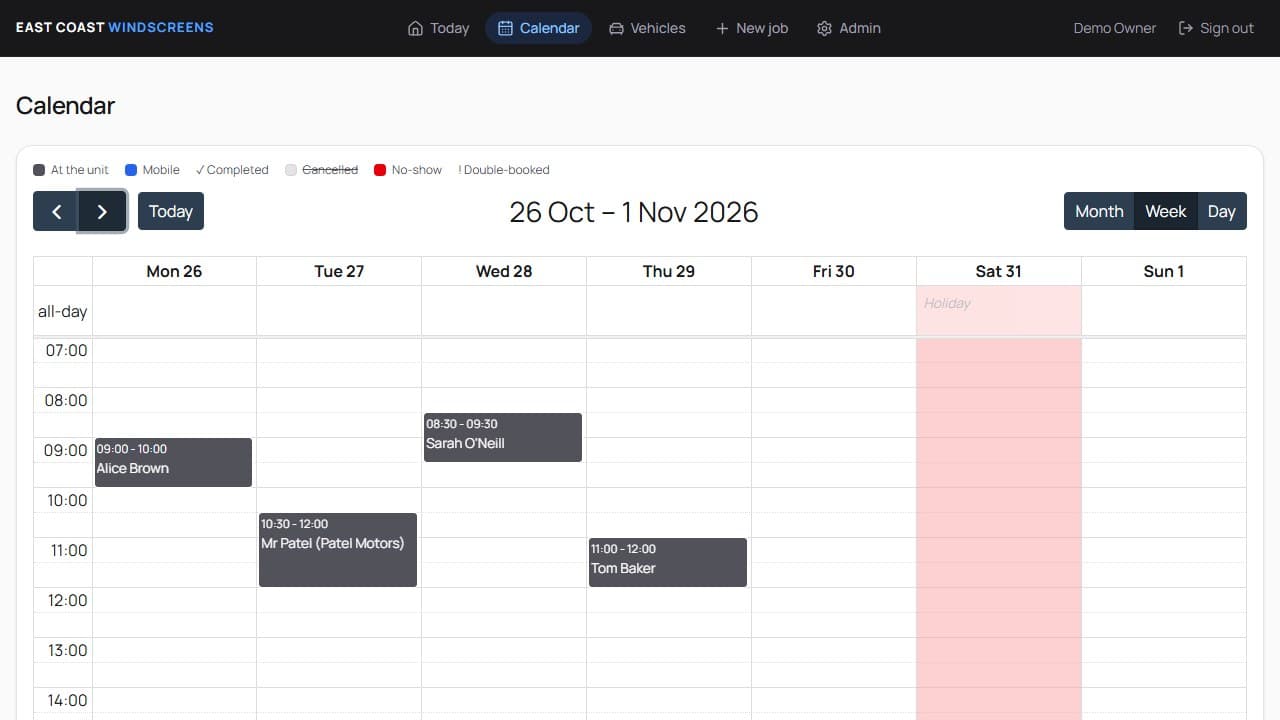
Two jobs can't land in the same slot, mobile jobs keep a travel gap between them, and days off and bank holidays are blocked before anyone can book them.
Booked in seconds
Find the customer as you type, or add a new one, and fill in the details that matter to your trade. For a windscreen fitter that meant the make and model filling in from the registration.
Reminders sent for you
Customers get an email, and a text if they want one, the day before. If a job moves, they're told. You can see whether each one was delivered.
In step with Google Calendar
Every booking, day off and note appears on the Google Calendar on your phone, and moves when the job moves.
Staff logins and roles
The owner and the team each sign in, with the owner-only settings kept to the owner, and a log of who changed what.
Automatic review requests
An hour after a job is marked done, the customer gets a short email asking for a Google review, once and never twice.
Every client gets access to the Buildory Client Portal: invoices, analytics and site progress in one place.
Learn morePricing
Pricing
Built for your business
Quoted after a free chat
Priced on what the system needs to do, as a fixed price in writing before any work starts. Hosting for the system is quoted with it.
- Fully custom-built, you own the code outright
- Works in any browser, on phone, tablet and desktop
- 1-to-1 support, direct from the founder
A real example
How it works
Our Workflow
- Step 1:
Introductions and Discovery
A proper conversation first: how the business works today, where it goes wrong, and what the system needs to do. No jargon, no obligation.
- Step 2:
Scope and Design
A clear written scope, the price and the timeline agreed up front, then the screens designed, so you see it before anything is built.
- Step 3:
Development & Testing
Built properly and tested on phones, tablets and desktops, with your feedback along the way, not just at the end.
- Step 4:
Launching and On-boarding
It goes live, your existing records come across, and your team gets a walk-through. Support carries on after launch.
Questions
Questions people ask
Can customers book online themselves?
It can be built in. Some businesses want staff to take every booking, others want customers to pick a slot. Either way the same rules apply, so an online booking can never clash with one taken over the phone.
Will it work with our Google Calendar?
Yes. Bookings are pushed to a Google Calendar you choose, so they show on your phone alongside everything else, and they move or disappear when the booking does.
Can you move our existing bookings across?
Yes. Part of going live is bringing your existing bookings and customers in, so nothing is lost on the day you switch over.
Does it work on phones?
Yes. It runs in any browser on a phone, tablet or computer, with nothing to install, so the team can use it in the van or at the counter.
How much does a booking system cost?
It depends on what it needs to do. After a free chat you get a fixed price and a timeline in writing, before any work starts.
Still booking jobs on paper?
Tell us how bookings work today, from the first call to the job being done, and we'll show you what a proper system would look like.